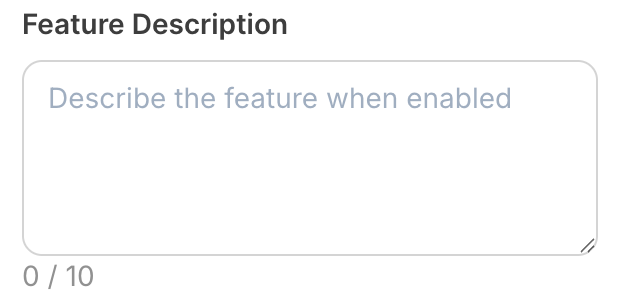
{
    "type": "textarea",
    "name": "feature_description",
    "label": "Feature Description",
    "placeholder": "Describe the feature when enabled", // optional
    "default": "This text describes the feature", // optional
    "max_length": null, // optional - null for unlimited
    "required": false, // optional
    "help": "Only appears when feature toggle is enabled", // optional
    "dependencies": [
      {
          "field": "enable_feature"
          // no value property - shows when enable_feature has any value
      }
    ] // optional
  }
  {
    "settings": {
      "feature_description": "This feature enables advanced analytics tracking for user interactions, providing detailed insights into engagement patterns and conversion metrics. It includes real-time monitoring, custom event tracking, and comprehensive reporting dashboards."
      // ...additional plugin settings
    }
    // ...plugin-specific additional data
  }
Plugin component library
Textarea
  {
    "type": "textarea",
    "name": "feature_description",
    "label": "Feature Description",
    "placeholder": "Describe the feature when enabled", // optional
    "default": "This text describes the feature", // optional
    "max_length": null, // optional - null for unlimited
    "required": false, // optional
    "help": "Only appears when feature toggle is enabled", // optional
    "dependencies": [
      {
          "field": "enable_feature"
          // no value property - shows when enable_feature has any value
      }
    ] // optional
  }
  {
    "settings": {
      "feature_description": "This feature enables advanced analytics tracking for user interactions, providing detailed insights into engagement patterns and conversion metrics. It includes real-time monitoring, custom event tracking, and comprehensive reporting dashboards."
      // ...additional plugin settings
    }
    // ...plugin-specific additional data
  }
The textarea component allows creators to enter longer, multi-line text content. It’s ideal for collecting descriptions, messages, body content, or any text that requires multiple lines and more space than a single-line input. The textarea provides an expandable interface that accommodates extensive text-based information.
Compatibility
Plugin type
Availability
Additional notes
Content blocks
Media source
Available as part of the preset search functionality. Check media source documentation for more details.
Properties
string
required
textarea - the type of the component
string
required
A unique internal-only identifier that is posted to an app’s plugin server to share values inputted by the creator
string
required
Creator-facing identifier that is shown in the plugin environment (64 character limit)
string
Placeholder text displayed in the textarea when empty
string
Default value when the component first loads
number | null
Maximum character limit for the textarea content. Set to null for unlimited length
boolean
Determines whether the creator must enter text before proceeding
string
Brief creator-facing explanation that clarifies the component’s purpose and usage (256 character limit. Supports markdown: [text](url), **bold**, and *italic*)
object array
Allows for the field to be shown conditionally, dependent on other fields. See dependencies page for more details.
Show properties
string
required
Name of the dependent field
string
Value for the dependent field required to show this field. To show when any value is inputted, leave out this property.
  {
    "type": "textarea",
    "name": "feature_description",
    "label": "Feature Description",
    "placeholder": "Describe the feature when enabled", // optional
    "default": "This text describes the feature", // optional
    "max_length": null, // optional - null for unlimited
    "required": false, // optional
    "help": "Only appears when feature toggle is enabled", // optional
    "dependencies": [
      {
          "field": "enable_feature"
          // no value property - shows when enable_feature has any value
      }
    ] // optional
  }
  {
    "settings": {
      "feature_description": "This feature enables advanced analytics tracking for user interactions, providing detailed insights into engagement patterns and conversion metrics. It includes real-time monitoring, custom event tracking, and comprehensive reporting dashboards."
      // ...additional plugin settings
    }
    // ...plugin-specific additional data
  }
Was this page helpful?
Assistant
Responses are generated using AI and may contain mistakes.